Component
Cross Section
Cuts chosen 3D objects with a plane and shows their inside in a section color, for architecture, product and teaching views.
What it does
A Cross Section cuts its Targets with a flat plane and shows the inside in the Section Color: a building cut open to show its floors, an engine cut in half, a body or a planet sliced for a lesson. The part on one side of the plane is cut away, and the cut surfaces inside the objects show in one solid color.
The plane is the Cross Section's own object. Move and rotate that object to move the cut; its up direction (green arrow) points at the part that is cut away. Flip cuts away the other side. Animate the object's position to sweep the cut through a model.
You change no material. While the cut is on, the targets' renderers show copies of their materials on the Pass Forge/Lit Effects shader, and when the component is switched off, the original materials come back.
Add it
- Create an empty object for the cutting plane, such as "Section Plane", and place it where the cut should be.
- Choose Add Component > Pass Forge > Cross Section.
- Drag the objects to cut into Targets. Their children are cut too.
- Rotate the plane object so its up direction points at the part to cut away, or tick Flip. Selecting it draws the plane as a square in the Scene view, with a short line showing which side is cut.
- Enter Play Mode to see the cut.
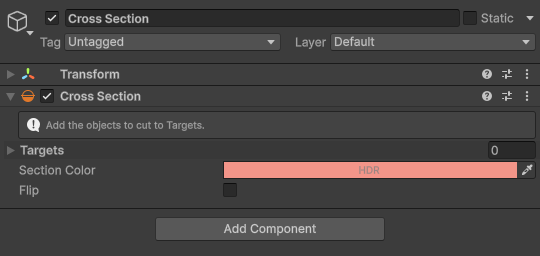
Settings
| Setting | What it does |
|---|---|
| Targets | Objects to cut, with their children. Mesh Renderers and Skinned Mesh Renderers under them are cut. A change in Play Mode takes effect on the next frame. |
| Section Color | Color of the cut surfaces inside the objects. HDR. Default red (0.9, 0.3, 0.25). |
| Flip | Cut away the other side of the plane. Off by default. |
What the inspector also shows:
- "Add the objects to cut to Targets." while Targets is empty.
- "No Mesh Renderer or Skinned Mesh Renderer found in Targets, so there is nothing to cut." when the targets have nothing to cut.
- "Cross Section is for 3D meshes: sprites are flat, so they are left as they are." when Targets hold sprites.
- In a scene drawn by the 2D Renderer, a note that the objects in Targets are cut unlit, with a plain inside.
Common jobs
Cut a building open to show its floors
- Add a Cross Section to an empty object above the building, rotated so its up direction points up.
- Drag the building into Targets.
- Move the plane object down through the building in Play Mode.
Everything above the plane is cut away, and the cut walls and floors show in the Section Color.
Sweep a cut through a product
Animate the plane object's position with an Animator or Timeline, from one side of the model to the other. The cut follows the object every frame.
Show the inside of a machine at the press of a button
Keep the Cross Section switched off in the scene, and switch it on from a UI Button's On Click (the component's enabled box) or a Moment's Toggle Component step. Switched off, the targets go back to their own materials.
Cut away the front half of a model
Tick Flip to cut away the other side without turning the plane.
From a script
using PassForge.Effects;
using UnityEngine;

public class SectionView : MonoBehaviour
{
    [SerializeField] PassForgeCrossSection m_Section;   // on the plane object
    [SerializeField] GameObject m_Engine;

    public void Show(GameObject[] parts)
    {
        m_Section.targets = parts;                       // objects to cut, with their children; next frame
        m_Section.sectionColor = new Color(1f, 0.8f, 0.2f);
        m_Section.enabled = true;
    }

    public void Hide() => m_Section.enabled = false;     // original materials come back

    void Update()
    {
        // Sweep the cut up and down through the engine: the plane's up points at the part cut away.
        var center = m_Engine.transform.position;
        m_Section.transform.position = center + Vector3.up * Mathf.Sin(Time.time);
    }
}
targets and sectionColor are public. Flip is set in the inspector; from a script, turn the plane object over instead.
Good to know
- 3D meshes only. It cuts Mesh Renderers and Skinned Mesh Renderers. Sprites are flat and have no inside, so they are left as they are.
- Play Mode only. The cut shows in Play Mode.
- Materials. A URP Lit material keeps every texture and setting while it is cut. A material on another shader (Shader Graph, toon, Unlit or a custom shader) is drawn as URP Lit while the cut is on, keeping only its base texture and color, and only when they are named
_BaseMapand_BaseColor, or_MainTexand_Color. - The inside. The inside of the cut is drawn from the targets' back faces, in the Section Color with a light hatch. A closed mesh shows a solid section. Every back face of a target shows the Section Color while the cut is on, so a single sided mesh, such as a plane, shows it from behind too.
- New children. The renderers of the targets are gathered when the component is enabled and when Targets changes. After adding children to a target, switch the component off and on.
- 2D Renderer. On the 2D Renderer, meshes are cut unlit, and the inside is plain rather than hatched.
- Builds. A build keeps the Lit Effects shader when a Cross Section is in one of its scenes. When a script adds the component while the game runs, tick Dissolve, Occluder Fade And Cross Section Added From Scripts under Project Settings > Pass Forge.
- No Volume needed. It is a material effect, so it needs no Volume and no Post Processing.
- One per object. Unity allows one Cross Section on an object. For two cuts, use two plane objects with different Targets.