How do I
Warn of an attack with a marker on the ground
Add a Pass Forge Ground Marker, set Fill Seconds for the countdown and press Add An Explosion Here; the marker fills up, plays its When Full moment and calls On Filled.
You want
Before a boss slams the ground, a red circle fills up under the player so they can step out of it, as in action RPGs and MMOs.
Steps
- Create an object for the warning, separate from the enemy so it stays where the player stood, and add Add Component > Pass Forge > Ground Marker.
- Pick a Shape: a circle, ring, cone, line or square. Set Radius, and Angle for a cone or Width for a ring or line.
- Set Color, Edge Width, Fill Opacity and Pulse.
- Set Fill Seconds for the countdown. The marker fills up by itself once it is enabled in Play Mode.
- Press Add An Explosion Here. It adds a Moment with the Explosion preset to this object, played only when the marker fills up, and puts it in When Full. Pick another preset on that Moment if you like.
- Tick Switch Off When Full, so the marker hides once it fills and counts down again when it or its object is enabled again. That suits markers from a pool.
- Use On Filled for the damage: check whether the player is inside the marker.
- Turn on Preview In Edit Mode to watch the countdown play again and again. When Full and On Filled wait for Play Mode.
Inspector
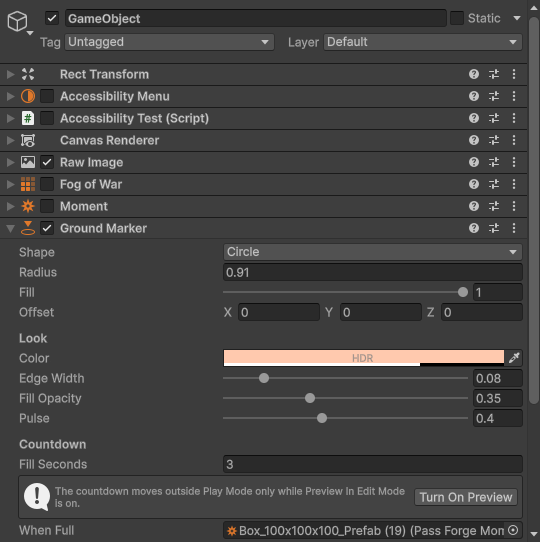
What you should see
The shape paints on the ground under the marker and fills from its center or its start over Fill Seconds, then the explosion plays where it is.
If it does not work
- Nothing shows on the ground. Ground Markers are a screen effect laid on what the camera's depth shows: run Tools > Pass Forge > Set Up Effects and turn Post Processing on for the camera. They need no Volume.
- The inspector warns about the 2D Renderer. The 2D Renderer keeps no depth of the scene, so there is no ground to paint. Ground Markers are for 3D and 2.5D games; in a 2D game, a sprite under the object does the same job.
- A ring never fills. A ring has no inside to fill, so its countdown only times When Full.
- The marker paints the player's legs. It paints what stands on the ground within its reach, as the Route does. A Pass Forge Effect Mask on the player with the Ground Markers effect's Mask at Except Masked Objects keeps it off.
From a script
using PassForge.Effects;
using UnityEngine;
using UnityEngine.Events;

public class SlamAttack : MonoBehaviour
{
    [SerializeField] PassForgeGroundMarker m_Warning;   // a separate object
    [SerializeField] Transform m_Player;
    [SerializeField] UnityEvent m_PlayerHit;

    void OnEnable() => m_Warning.onFilled.AddListener(Slam);
    void OnDisable() => m_Warning.onFilled.RemoveListener(Slam);

    public void Telegraph()
    {
        if (m_Warning.isFilling)
            return;

        m_Warning.transform.position = m_Player.position;
        m_Warning.StartFilling(1.2f);   // uses the marker's When Full and Switch Off When Full
    }

    public void Cancel() => m_Warning.StopFilling();

    void Slam()
    {
        var offset = m_Player.position - m_Warning.transform.position;
        offset.y = 0f;

        if (offset.magnitude <= m_Warning.radius)
            m_PlayerHit.Invoke();
    }
}