Component
Radar Blip
Puts an object on every Fog of War Radar, or gives it a kind, shape, color or size of its own there, or keeps it off radars.
What it does
Fog of War Radars already show enemies on the fog's hiding layers, your side's Fog Revealers and Off-screen Indicators, with nothing added. A Radar Blip is for everything else, and for objects that need a look of their own.
Put one on a vehicle, a loot crate, an NPC or a pickup to show it on radars. Set its Kind to Hostile, Friendly, Neutral or Objective, and it takes that kind's color, shape and fog rule: hostile and neutral blips show only what the fog shows. In a multiplayer match, By Team makes a player friendly on their teammates' radars and hostile on the other side's. Show Beyond Range keeps a quest target on the radar's rim, pointing the way to it.
Switched off, a Radar Blip keeps its object off radars, such as one enemy on a hiding layer you want to hide from the radar.
Radar Blips need no Unity UI package, so enemy prefabs can carry them in any project. The radar itself needs it.
Add it
- Select the object, or the enemy prefab.
- Choose Add Component > Pass Forge > Radar Blip.
- Make sure the scene has a radar. While none is in the open scenes, the Inspector offers Add Radar, which puts a Military Fog of War Radar in the top right corner of a new canvas. It is hidden in Prefab Mode, where a new canvas would go into the prefab.
- Press Play. The object shows as a red diamond on the radar while your side sees it.
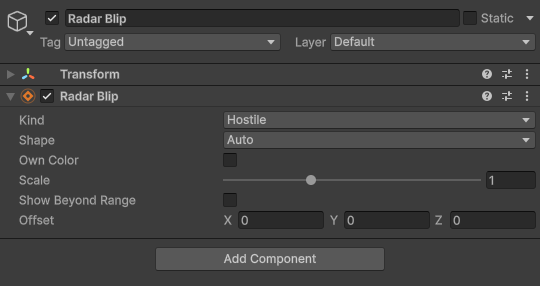
There is no GameObject menu item for it.
Settings
| Setting | What it does |
|---|---|
| Kind | Hostile (default): an enemy, shown only while your side sees it. Friendly: your side, always shown. Neutral: such as a building or treasure, shown once its place is explored. Objective: always shown, and waits on the rim while out of range. By Team: friendly when the Fog of War shows its team and hostile otherwise, for multiplayer; friendly when there is no fog. The fog rules apply while the radar's Show is What The Fog Shows; Everything In Range shows every kind. |
| Team | Shows for By Team. The side this object is on, from 0 to 31. Default 0. A Fog Revealer on the same object gives its own team instead, and the field then reads "Team N, from the Fog Revealer". |
| Shape | Auto (default) draws enemies as diamonds, friends as arrows pointing the way they face, neutral things as squares and objectives as dots. Or pick Dot, Diamond, Arrow or Square. For an icon, use an Off-screen Indicator with the Icon shape instead. |
| Own Color | Use a color of its own instead of the radar's color for its kind. Off by default. |
| Color | Shows with Own Color. The blip's own color. Default white. |
| Scale | Size of this blip next to the others, from 0.5 to 2. Default 1. |
| Show Beyond Range | Keep the blip on the radar's rim, pointing the way to it, while it is out of range, such as a quest target. Off by default. |
| Offset | The point the blip marks, in the object's local space. |
Notes the Inspector shows
- "No Fog of War Radar is in the open scenes yet", with Add Radar. In a project without the Unity UI package, a note says radars need it.
- "Switched off, it keeps this object off radars."
- "May not show: more than 32 things are in a radar's range at once", from the radar's limit.
Selecting the object draws a small diamond in the kind's color where the blip marks.
Common jobs
Put loot on the radar
Add a Radar Blip to the loot crate, set Kind to Neutral, and turn on Own Color with a gold color. The crate shows as a gold square once its place is explored.
Allies and enemies in a team match
- Add a Radar Blip to the player prefab and set Kind to By Team.
- Give each player's Fog Revealer its team, or set the blip's Team when the player spawns.
- On each machine, set
fog.visibleTeams = 1 << localTeam;.
Teammates show as blue arrows and opponents as red diamonds, on every machine the right way round.
Keep one enemy off the radar
Add a Radar Blip to it and switch the component off. The rest of the enemies on the hiding layer still show.
A big boss blip
Set Scale to 2 and Shape to Diamond. The boss stands out from the other enemies.
A quest target on the rim
Set Kind to Objective and turn Show Beyond Range on. While the target is out of range, its blip waits on the rim and points the way.
From a script
using PassForge.Effects;
using UnityEngine;

public static class RadarMarks
{
    // A player in a team match: friendly or hostile by the fog's Visible Teams.
    public static void ForPlayer(GameObject player, int team)
    {
        var blip = player.AddComponent<PassForgeRadarBlip>();
        blip.kind = RadarBlipKind.ByTeam;
        blip.team = team;                        // 0 to 31; a Fog Revealer on the object gives its own instead
    }

    // A quest target that waits on the rim while out of range.
    public static void ForQuest(GameObject target)
    {
        var blip = target.AddComponent<PassForgeRadarBlip>();
        blip.kind = RadarBlipKind.Objective;
        blip.showBeyondRange = true;
        blip.ownColor = true;
        blip.color = new Color(1f, 0.8f, 0.2f);  // gold, as picked
        blip.scale = 1.5f;                       // 0.5 to 2
    }

    // Keep an object off every radar, such as a stealthed unit.
    public static void Cloak(GameObject unit, bool cloaked)
    {
        if (!unit.TryGetComponent(out PassForgeRadarBlip blip))
            blip = unit.AddComponent<PassForgeRadarBlip>();

        blip.enabled = !cloaked;                 // switched off, it keeps the object off radars
    }
}
Good to know
- One per object. An object holds one Radar Blip.
- Which object it stands for. A Radar Blip stands for the hiding object it is on, or for the objects just under it while they lie together within 4 m as one body. On a group, such as an Enemies object or a spawner, it stands for itself only. A switched off Radar Blip on one part of a creature keeps that part off radars.
- Limits. A radar draws 32 blips at once, the nearest, objectives first.
- Switched off objects never show, so pooled and dead enemies leave radars by themselves. Switching only an object's renderers off does not.
- Floors. Blips more than the radar's Other Floor At above or below the player draw hollow, with an arrow up or down, measured from each object's pivot.
- Capture Map From Above leaves out objects with a Radar Blip, so they are not painted onto the minimap's picture.
- World Map. With a Fog of War Radar on the World Map's object, Radar Blips show on the full-screen map too.
- 2D. On a 2D radar, Arrow blips face the way the object's Y axis points.