How do I
Light up only the object the player is facing
Set a Pass Forge Highlight Trigger to Proximity with the player as Tracked and turn on Only When Facing, so of two chests in reach only the one the player turns to lights up.
You want
Two chests stand side by side. Walking up to them should light up only the one the player turns toward, so the player knows which one the interact key opens.
Steps
- On each chest, add Add Component > Pass Forge > Highlight Trigger, which adds a Pass Forge Highlight, and pick a look in the Highlight's Preset, such as Pickup Pulse.
- Set Mode to Proximity.
- Drag the player into Tracked. Empty uses the main camera.
- Pick a Proximity Area:
- Around Object: within Radius of the box around the object's renderers, lined up with the world axes, so it means the same for a crate as for a house.
- Sphere: within Radius of a point moved by Area Offset.
- Box: inside a box of Area Size at Area Offset, turned with the object, such as the space in front of a door.
- Trigger Colliders: inside the trigger colliders on the object or its children.
- Turn on Only When Facing. Facing Angle appears, set to 45 degrees to either side. Lower it for a tighter choice.
- Set Fade In and Fade Out, and use On Highlighted and On Unhighlighted to show and hide an interact prompt.
Inspector
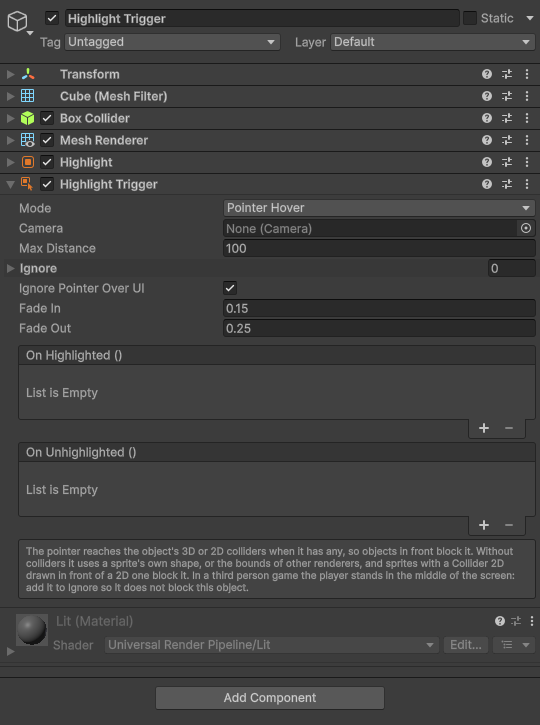
What you should see
Selecting the trigger draws its area in the Scene view and, with Only When Facing on, the facing angle as a fan in front of the tracked object. Both turn green in Play Mode while the tracked object is in. A chest lights up only while the player is in its area and turned toward it.
A camera counts where it looks. A character counts where it faces on the level, so looking up or down does not matter.
If it does not work
- A long or L-shaped object lights up too early. Around Object measures from the box around its renderers, which can be bigger than the object itself. Use Box or Trigger Colliders for a tighter area.
- Nothing lights up. Check Tracked. With it empty, the main camera counts, which in a third person game is behind the player.
- Both chests light up. Only When Facing is off, or Facing Angle is wide enough to take in both. Lower it.
- Trigger Colliders never lights up. The inspector says when the object and its children have no trigger collider. Add a collider in the shape the area should have and turn on Is Trigger. It needs no Rigidbody, and the tracked object counts while its position is inside.
From a script
using PassForge.Effects;
using UnityEngine;

public class ChestPrompt : MonoBehaviour
{
    [SerializeField] PassForgeHighlightTrigger m_Trigger;   // Mode: Proximity
    [SerializeField] GameObject m_Prompt;

    void OnEnable()
    {
        m_Trigger.facingAngle = 30f;   // zero switches the facing check off
        m_Trigger.onHighlighted.AddListener(Show);
        m_Trigger.onUnhighlighted.AddListener(Hide);
    }

    void OnDisable()
    {
        m_Trigger.onHighlighted.RemoveListener(Show);
        m_Trigger.onUnhighlighted.RemoveListener(Hide);
    }

    void Show() => m_Prompt.SetActive(true);
    void Hide() => m_Prompt.SetActive(false);

    public bool CanOpen => m_Trigger.isHighlighted;
}