How do I
Mark a quest target from far away
Select the target and choose GameObject > Pass Forge > Beacon; a pillar of light rises over it, fades near the camera, and shows through walls when the Beacons effect's Show Through Walls is on.
You want
The player sees a column of light over the next objective from across the map, like the loot beams and rally points of open world games, and it does not block the view once they arrive.
Steps
- Select the target in the scene and choose GameObject > Pass Forge > Beacon. It adds Pass Forge Beacon to each selected object, or switches on one it already has. With nothing selected, it creates a Beacon object where the Scene view looks.
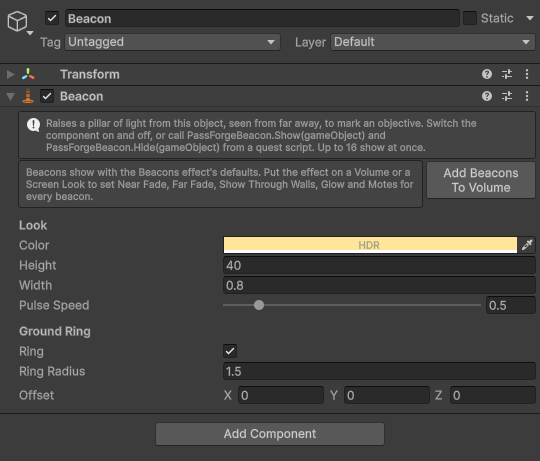
- Set the beacon's Color, Height and Width, and Pulse Speed for pulses of light. Zero holds it steady.
- Tick Ring to paint a ring on the ground around the beacon's foot, and set Ring Radius. The ring stays as the camera comes close.
- Set Offset to move the pillar's foot, in the object's local space. The pillar always rises straight up.
- To set Near Fade, Far Fade, Show Through Walls, Top Fade, Glow and Motes for every beacon, press Add Beacons To Volume in the inspector. It adds the Beacons effect to the scene's global Volume, making an Effects Volume first when there is none.
- Tick Show Through Walls in that Beacons effect so the objective is always found. Off, a beacon hides behind nearer geometry.
Inspector
What you should see
A pillar of light stands over the target. It fades out closer to the camera than Near Fade, gone at a third of it, so it never blocks the view where the player has arrived, and fades out past Far Fade. Up to 16 draw at once, nearest first.
If it does not work
- The beacon does not show. Beacons are a screen effect: run Tools > Pass Forge > Set Up Effects and turn Post Processing on for the camera. They need no Volume.
- It vanishes behind a hill. Show Through Walls is off in the Beacons effect.
- It covers the player. Add a Pass Forge Effect Mask to the player and set the Beacons effect's Mask to Except Masked Objects.
- The inspector says this one does not show. It names the reason, such as more than 16 beacons enabled at once, when only the nearest show.
From a script
using PassForge.Effects;
using UnityEngine;

public class QuestBeacons : MonoBehaviour
{
    public void NextTarget(GameObject target)
    {
        PassForgeBeacon.HideAll();
        PassForgeBeacon.Show(target);   // adds a beacon when the object has none
    }

    public void Reached(GameObject target) => PassForgeBeacon.Hide(target);
}