How do I
Keep game clicks from going through UI menus
Highlight Triggers ignore a pointer over UI with Ignore Pointer Over UI, which is on by default; in your own click code, return early when EventSystem.current.IsPointerOverGameObject() is true.
You want
The player clicks a button in your inventory panel, and the character also walks to the spot behind the button, or the enemy behind it gets selected.
Steps
- Make sure the scene has an Event System (GameObject > UI > Event System) and that your canvas has a Graphic Raycaster. Unity's UI only knows what the pointer is over through them.
- On UI elements that should block clicks, keep Raycast Target on the Image or Text. An element with it off lets clicks through, which suits a decorative full screen backdrop.
- On every Pass Forge Highlight Trigger in Pointer Hover or Pointer Click mode, keep Ignore Pointer Over UI on, as it starts. A pointer over a UI element then does not reach the object behind it.
- In your own click code, such as click to move, ask Unity's Event System first and return when the pointer is over UI, as below. Pass Forge's Arena sample does the same before it moves the player.
Inspector
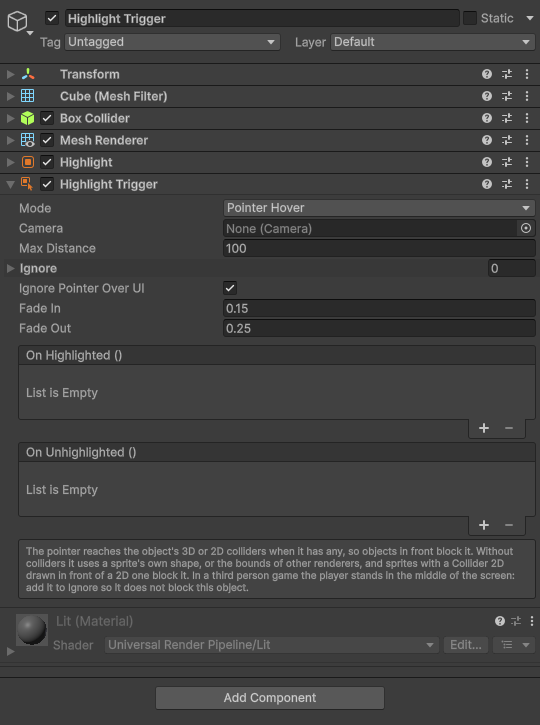
What you should see
Clicks and taps on menus, buttons and panels stay in the UI. Clicks on the game world reach your game code and the Highlight Triggers as before.
If it does not work
- Clicks still go through. The scene has no Event System, so
EventSystem.currentis null, or the UI element has Raycast Target off. - A full screen backdrop blocks every game click. A PF Panel backdrop with Raycast Target on blocks the whole screen while it is shown. That suits a pause menu; turn the panel's object off when the menu closes.
- The Highlight Trigger ignores UI checks. The check needs the Unity UI package. Without it, nothing counts as UI.
- A physics raycaster on the camera blocks clicks. A Physics Raycaster reports the scene's own objects. Highlight Triggers leave its hits out, and your code can check
RaycastResult.modulethe same way.
From a script
using UnityEngine;
using UnityEngine.EventSystems;

public class ClickToMove : MonoBehaviour
{
    // Call from your input code with the click's screen position.
    public void OnClick(Vector2 screenPoint)
    {
        // True while the mouse is over a UI element with Raycast Target on.
        var events = EventSystem.current;
        if (events != null && events.IsPointerOverGameObject())
            return;

        var ray = Camera.main.ScreenPointToRay(screenPoint);
        if (Physics.Raycast(ray, out RaycastHit hit, 200f))
            MoveTo(hit.point);
    }

    void MoveTo(Vector3 point)
    {
        // Your own movement code.
    }
}
EventSystem and IsPointerOverGameObject belong to Unity's UI package, not to Pass Forge.