How do I
Outline an object when the mouse is over it
Add a Pass Forge Highlight and a Pass Forge Highlight Trigger set to Pointer Hover; the trigger switches the highlight on while the mouse, a pen or a finger is over the object.
You want
Doors, chests and items glow or get an outline when the player points at them, and you do not want to write a raycast script.
Steps
- Select the object and add Add Component > Pass Forge > Highlight Trigger. It adds a Pass Forge Highlight with it.
- On the Highlight, pick a look in Preset, such as Hover Glow or Selection Outline. With no profile it draws a plain orange outline on the parts the camera sees.
- On the Highlight Trigger, set Mode to Pointer Hover.
- Set Max Distance, the farthest distance from the camera at which the pointer reaches the object.
- In a third person game, drag the player into Ignore, so the player's body does not block the pointer.
- Set Fade In and Fade Out in seconds.
- Use On Highlighted and On Unhighlighted for a sound or a tooltip.
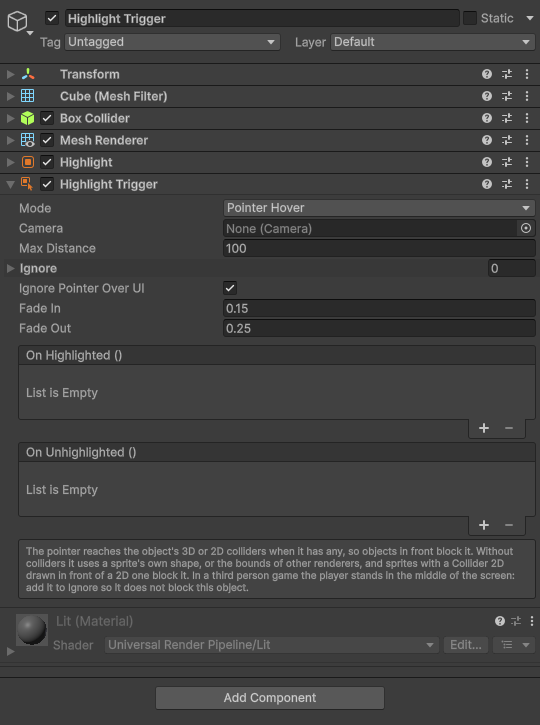
For selection with a click, set Mode to Pointer Click. Only One Selected deselects the others, Click Elsewhere Deselects deselects on a click that misses, and Flash On Click flashes the object. For first person interaction, Screen Center highlights what the middle of the screen aims at.
What you should see
The highlight fades in while the pointer is over the object and fades out when it leaves. The trigger decides when the highlight shows, so the Highlight starts switched off in Play Mode. Mouse, pen and touch work with the Input System package and the old Input Manager.
If it does not work
- The pointer never reaches the object. It reaches the object's colliders when it has any, 3D or 2D, so objects in front block it. Without colliders it uses a sprite's shape, or the bounds of other renderers. A sprite with a Collider 2D drawn in front of a 2D one blocks it too.
- Hovering over a menu highlights what is behind it. Ignore Pointer Over UI is on by default and keeps a pointer over UI from reaching the object. It needs the Unity UI package and an Event System in the scene.
- The inspector warns there is nothing to highlight. The Highlight draws Mesh Renderers, Skinned Mesh Renderers and Sprite Renderers. Particle systems, trails and Tilemaps are left out, and the inspector names them.
- The outline shows nothing at all. Run Tools > Pass Forge > Set Up Effects.
From a script
using PassForge.Effects;
using UnityEngine;

public class UnitSelection : MonoBehaviour
{
    [SerializeField] PassForgeHighlightTrigger m_Hero;   // Mode: Pointer Click

    void OnEnable() => m_Hero.onClicked.AddListener(OnHeroClicked);
    void OnDisable() => m_Hero.onClicked.RemoveListener(OnHeroClicked);

    void Start() => m_Hero.Select();

    public void ClearSelection() => PassForgeHighlightTrigger.DeselectAll();

    void OnHeroClicked()
    {
        if (m_Hero.isSelected)
            Debug.Log("Open the hero's panel here.");
    }
}
Any Highlight fades with FadeIn(seconds) and FadeOut(seconds); the second switches it off once it is gone.