Component
Fog Revealer
Clears the Fog of War around its object, in a circle or a view cone, stopped by walls when you want, for one team.
What it does
A Fog Revealer opens the Fog of War around its object. Put it on the player, on every unit and building in a strategy game, on a watch tower, a camp fire or a scout drone. What it sees now is clear, and the places it has seen stay explored as the fog's Explored Places says.
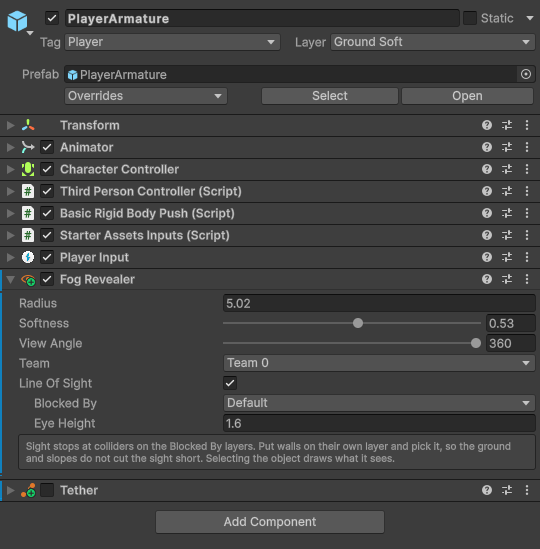
It sees in a circle of its Radius, or in a cone with View Angle below 360, for guards and stealth games. With Line Of Sight on, walls and other colliders on the Blocked By layers stop its sight, so what is behind a wall stays hidden. Select the object to see what it sees drawn in the Scene view.
Each revealer has a Team from 0 to 31. The Fog of War opens only for the teams ticked in its Visible Teams, so in a multiplayer match each player's machine shows only that side's sight, and enemy units never uncover your map.
A side's revealers all open the same map, so what any unit sees is open to its whole side. Add the revealer once to each unit prefab, with the sight radius that unit type has.
Add it
- Select the player, or a unit prefab.
- Choose Add Component > Pass Forge > Fog Revealer.
- Make sure the scene has a Fog of War (Add Component > Pass Forge > Fog of War on an object at the center of the play area), and that the revealer stands inside its Size.
- Press Play. The fog opens in an 8 meter circle around the object.
The Fog of War's Inspector offers Add a Fog Revealer to the object tagged Player while the scene has none. There is no GameObject menu item for it.
Settings
| Setting | What it does |
|---|---|
| Radius | How far this object sees, in meters, at least 0.1. Default 8. |
| Softness | Share of the radius over which sight fades out at its edge, from 0.01 to 1. Default 0.25. |
| View Angle | How wide this object sees, in degrees, around the way it faces, from 10 to 360. Default 360, all around. Less sees in a cone, for guards and stealth games. In 3D it faces its forward direction; in 2D, the way its Y axis points. |
| Team | The side this object sees for: Team 0 to Team 31. Default Team 0. A Fog of War opens only for the teams in its Visible Teams. |
| Line Of Sight | Walls and other colliders on the Blocked By layers stop this object's sight, so what is behind them stays hidden. Off by default. Casts 90 rays each map update while this object's sight reaches the map. |
| Blocked By | Shows with Line Of Sight. Layers whose colliders stop sight. Default Default. Leave out the ground and the object itself. |
| Eye Height | Shows with Line Of Sight. Height of the eyes above this object's position, in meters, where the sight rays start. Default 1.6. |
Notes the Inspector shows
- When the Team is not one of the Fog of War's Visible Teams: this object opens nothing. That suits an enemy unit; for one of the player's own, pick a team the fog shows.
- With Line Of Sight: sight stops at colliders on the Blocked By layers, so put walls on their own layer and pick it. If the project has the Physics module turned off, a warning says nothing can stop the sight.
Common jobs
A guard with a view cone
- Add a Fog Revealer to the guard and set View Angle to 90 and Radius to 12.
- Turn Line Of Sight on, and set Blocked By to your Walls layer.
The guard's sight is a cone in front of it that stops at walls. Selecting the guard draws the cone in the Scene view. On a Fog of War Radar, revealers of your side show as arrows pointing the way they face.
Walls that block sight without slopes cutting it short
- Make a layer named Walls and put your walls on it.
- On every revealer with Line Of Sight, set Blocked By to Walls only.
With Blocked By at Default, the ground, slopes and stairs on Default can cut the sight short.
Enemy units that never uncover your map
Set the enemy units' revealers to another Team, such as Team 1, and keep Team 1 unticked in the Fog of War's Visible Teams. They still count as their side's sight on a machine that shows Team 1.
Units spawned in play
Add the revealer to the unit prefab, or from code with AddComponent<PassForgeFogRevealer>(). Set team as the unit spawns. The fog picks up enabled revealers by itself.
A tower that sees once, for good
For a lookout that explores a region at once and needs no revealer afterwards, call PassForgeFogOfWar.current.ExploreAround(tower.position, radius) instead.
From a script
using PassForge.Effects;
using UnityEngine;

public static class FogSight
{
    // A unit spawned while the game runs opens the fog around it, for its team.
    public static PassForgeFogRevealer AddSight(GameObject unit, float radius, int team, LayerMask walls)
    {
        var revealer = unit.AddComponent<PassForgeFogRevealer>();
        revealer.radius = radius;          // meters, at least 0.1
        revealer.team = team;              // 0 to 31
        revealer.lineOfSight = true;       // walls stop the sight
        revealer.blockedBy = walls;        // a layer of their own, without the ground
        revealer.eyeHeight = 1.6f;         // where the sight rays start
        return revealer;
    }

    // A guard that sees in a cone in front of it.
    public static void MakeGuard(PassForgeFogRevealer revealer)
    {
        revealer.viewAngle = 90f;          // 10 to 360 degrees
        revealer.softness = 0.15f;         // a sharper edge
    }
}
Good to know
- Several per object. An object can hold more than one Fog Revealer, such as a wide circle plus a long view cone.
- Inside the area. In One Area, a revealer outside the Fog of War's Size opens nothing. The Fog of War Inspector warns when every revealer is outside, with Center the Fog on your player. In Open World, revealers anywhere in the world keep seeing and exploring.
- Line of sight cost. Each revealer with Line Of Sight casts 90 rays each map update while its sight reaches the map. Leave it off for units where walls do not matter.
- Physics. In 3D, line of sight hits 3D colliders and needs the Physics module. In 2D, with the fog's Plane at XY (2D), it hits 2D colliders.
- The fog's Vertical Range limits how far above and below a revealer sees. Heights are measured from the revealer's position.
- On radars and minimaps. Enabled revealers of the fog's Visible Teams show as dots on Fog of War Minimaps (the first eight enabled) and as your side on Fog of War Radars, with nothing added. A Radar Blip set to By Team on the same object takes its team from this revealer.
- Capture Map From Above leaves out objects with a Fog Revealer, with their children and lights, so the player does not end up painted on the map.
- Switched off, a revealer opens nothing and leaves the minimap and radars.