How do I
Put blood on the camera lens when the player is hit
Add Pass Forge Lens Blood to the camera with GameObject > Pass Forge > Lens Blood, then splat from a Moment's Lens Blood step or PassForgeLensBlood.SplatOnEdge(attacker.position).
You want
When the player is hit, blood splatters on the camera lens on the side the hit came from, runs down, dries and fades. A shot point blank covers the middle of the lens.
Steps
- Select nothing and choose GameObject > Pass Forge > Lens Blood. With nothing selected it adds Pass Forge Lens Blood to the main camera's object. Lens Blood belongs on the camera: the blood is on the lens.
- Set the look: Color, Size, Seconds, Drip, Dries, Refraction and Gloss, or fill it with a liquid: Blood, Alien Blood, Oil or Paint.
- Keep Keep Middle Clear above zero, so splats land off the middle and the crosshair stays readable. Zero lets blood land anywhere.
- Press the Try buttons to land sample blood in the Game view without playing.
- For the player being hit, pick SplatHit or SplatHeavyHit on the Lens Blood component in the player's own UnityEvents, or call
PassForgeLensBlood.SplatOnEdge(attacker.position)from code. - For enemies, put a Lens Blood step on the enemy prefab's moment and play the moment from its event. Keep Within at a few meters, so only hits close to the player reach the lens. It is 3 when the step is added; keep 0 only for a moment on the player or played with its attacker. Where It Is On Screen lands the blood where the moment is on screen; off, it lands on the edge of the lens on the moment's side.
- Pick WipeLens in a UnityEvent, or call
PassForgeLensBlood.Wipe(), on a heal or a respawn.
Inspector
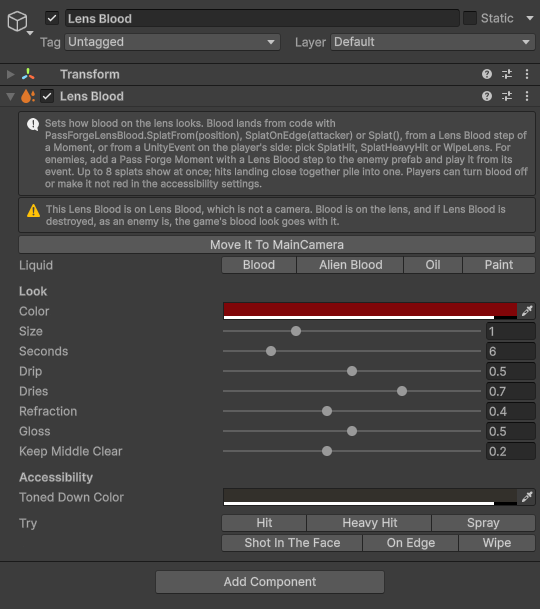
What you should see
Splats land, run down a little, dry darker and duller, then fade, and the picture bends through them. Up to eight show at once, and hits landing close together pile into one.
If it does not work
- The inspector says the Lens Blood is on an object that is not a camera. If that object is destroyed, as an enemy is, the game's blood look goes with it. Press Move It To followed by the main camera's name.
- Every enemy hit splatters the lens, however far away. The step's Within is 0, which reaches the lens from any distance. Set it to a few meters; the step's inspector offers a button.
- No blood shows. Run Tools > Pass Forge > Set Up Effects and turn Post Processing on for the camera. Check that the player's Blood setting is not Off and that no Volume sets Lens Blood Intensity to 0. Headsets show no blood.
- Blood stays after a respawn. Blood stays until it fades, across a scene load too. Call
PassForgeLensBlood.Wipe()to wipe it over 0.4 seconds, orClear()to clear it at once. - Players do not want red blood. The Accessibility Menu offers a Blood dropdown: Shown, Not Red or Off. Not Red shows red splats in the component's Toned Down Color.
From a script
using PassForge.Effects;
using UnityEngine;

public static class LensBloodHits
{
    // On the edge of the side the hit came from, as Damage Direction measures it.
    public static void HitFromSide(Vector3 attacker) => PassForgeLensBlood.SplatOnEdge(attacker);

    // Where the enemy is on screen, kept off the middle.
    public static void HitUpClose(Vector3 enemy) => PassForgeLensBlood.SplatFrom(enemy, LensBloodSplat.HeavyHit);

    public static void PointBlank() => PassForgeLensBlood.Splat(LensBloodSplat.ShotInTheFace);

    public static void AlienHit(Vector3 alien, Color green) =>
        PassForgeLensBlood.SplatFrom(alien, LensBloodSplat.Hit, 1f, green);

    public static void Healed() => PassForgeLensBlood.Wipe(0.5f);
}