How do I
Show damage numbers when an enemy is hit
Call PassForgeDamageNumbers.Spawn(enemy.transform, damage), or add a Damage Number step to a Moment and play it with PlayWithValue(damage); no Volume, canvas or font is needed.
You want
Hitting an enemy pops a number over its head, criticals pop bigger, heals show in green, and quick hits on the same enemy add up into one number that counts up.
Steps
- Make sure the effects are set up: Tools > Pass Forge > Set Up Effects, and Post Processing on the camera. Damage Numbers need no Volume.
- With no code in the enemy: add a Pass Forge Moment to the enemy, Add Step > Damage Number, and keep Use Played Value on. In your health script's On Damaged event, add the Moment and pick PlayWithValue under the dynamic float or int list. The Numbers group of ready made moments starts from there.
- From a UnityEvent without a moment: add GameObject > Pass Forge > Damage Numbers to the enemy and pick ShowDamage, ShowCritical, ShowHeal, ShowGain or ShowChange in the event. Below zero, ShowChange is damage; above zero, a heal.
- On the Damage Numbers component, set where numbers start: Start At Top of its renderers, Offset, and Follow to move with the object. Set Size and the color of each kind.
- Pick a Game Style on the component: Classic, Arcade, Clean or Retro. It is the same for every number in the game, so Pass Forge keeps it on the Damage Numbers effect in your Effects Volume, adding the effect there when it is missing.
- Press the Try buttons to see sample numbers in the Game view without playing.
Inspector
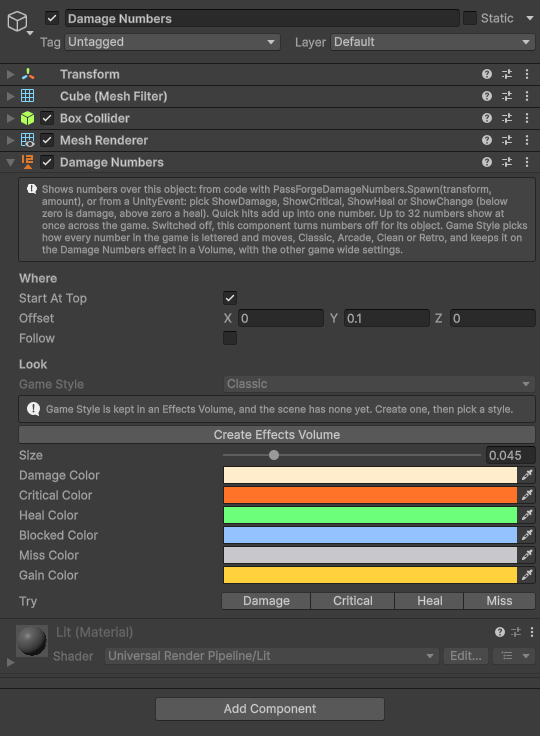
What you should see
Numbers pop from where the hit lands, rise and fade. Quick hits on the same object add up and pop again, and numbers that would cover each other step aside. Criticals are bigger, pop more and end in !.
If it does not work
- Quick hits do not add up. Pass the object that was hit:
Spawn(enemy.transform, damage), a Damage Numbers component's Show methods, or a moment played on the enemy or withPlayAt(enemy.transform, damage). Numbers at a position never add up, and criticals never do. - The step shows 10. The moment was played without a value, by
Play()or a UnityEvent with no number, so it shows its Otherwise number. Use PlayWithValue. - Some hits show no number. A moment held back by its Cooldown, Chance or Max Plays plays none of its steps. Set Cooldown to 0, which the step offers as a button.
- No number shows. Check that no Volume sets Damage Numbers Intensity to 0, that
PassForgeDamageNumbers.visibleis on, and that the object has no switched off Damage Numbers component, which turns its numbers off. The component's inspector says which it is. - A number shows 1.2K. Numbers too long for 12 characters shorten, and Format > Short shortens from 1,000.
- Hits off screen show nothing. Set the Damage Numbers effect's Off Screen to Keep At Edge in a Volume.
- Numbers keep moving during a hit stop. They count real time by default.
PassForgeDamageNumbers.unscaledTime = falsefreezes them with the game's time. - A word shows spaces. Letters A to Z, digits and
+ - . , % ! /draw, up to 12 characters.
From a script
using PassForge.Effects;
using UnityEngine;

public static class DamagePopups
{
    public static void Hit(Transform enemy, float damage, bool critical) =>
        PassForgeDamageNumbers.Spawn(enemy, damage, critical ? DamageNumberKind.Critical : DamageNumberKind.Damage);

    public static void Heal(Transform player, float amount) =>
        PassForgeDamageNumbers.Spawn(player, amount, DamageNumberKind.Heal);

    public static void Loot(Vector3 chest, float xp) =>
        PassForgeDamageNumbers.Spawn(chest, xp, DamageNumberKind.Gain, "XP");

    public static void Poison(Transform enemy, float damage, Color green) =>
        PassForgeDamageNumbers.Spawn(enemy, damage, DamageNumberKind.Damage, green);

    public static void Miss(Transform enemy) => PassForgeDamageNumbers.SpawnText(enemy, "MISS");
}
PassForgeDamageNumbers.visible = false hides every number, for an options menu. Pass Forge does not save it, so keep the choice in your own save.