How do I
Add fog of war that hides unexplored places
Add Pass Forge Fog of War to an object at the center of the play area, a Pass Forge Fog Revealer to the player, and put enemies on a layer picked in Hide While Unseen.
You want
The map starts covered. The player uncovers it by walking around, places seen before stay dimmed, and enemies show only while the player can see them.
Steps
- Create an empty object at the center of the play area and add Add Component > Pass Forge > Fog of War.
- Set Size to the width and depth of the covered area, in meters, and Resolution for how fine the edges are. Set Plane to XY (2D) for a 2D game.
- Pick a Style: Shroud, Mist, Clouds, Parchment Map, Blueprint, Signal Static or Frosted Blur. Keep Density at 1 to hide unseen places completely.
- Set Explored Places: Close Again, stay Faded, or Stay Open.
- Add Add Component > Pass Forge > Fog Revealer to the player. The Fog of War inspector offers Add a Fog Revealer to followed by the player's name when the scene has none. Set its Radius.
- Tick Line Of Sight on the revealer so walls on the Blocked By layers stop its sight. Put walls on a layer of their own for it. View Angle below 360 makes it see in a cone, for guards.
- Put enemy units on a layer of their own, such as Enemy, and pick it in Hide While Unseen. Put enemy buildings or treasure in Hide Until Explored. Keep the Default layer out of both.
- Keep Reveal In Edit Mode on, so the whole area stays clear while you work on the scene.
Inspector
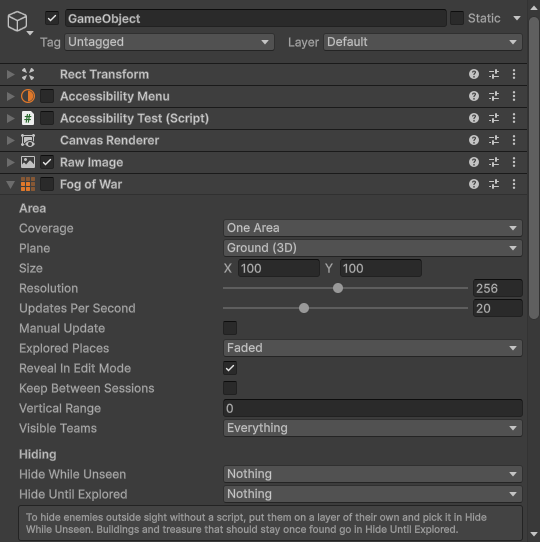
What you should see
In Play Mode everything starts hidden, the revealer opens the fog around the player, and enemies on the Hide While Unseen layers show only while a revealer sees them, including those spawned later.
If it does not work
- Part of the map is already open when Play starts. Keep Between Sessions brings back the map saved on this machine last time; call
ForgetKeptMap()for a new game. A script may callExploreAround,ExploreAllorLoadExplored. What the fog explored while you worked in Edit Mode is forgotten when Play starts. - The land shows through the fog. The Parchment Map, Blueprint and Frosted Blur styles draw the lay of the land by design, as a map does, but never what moves on it. Density below 1 lets shapes show faintly in every style.
- Everything stays hidden. No Fog Revealer is in the scene, every revealer is outside the fog's Size, or Visible Teams is Nothing. The inspector says which.
- The ground and the player hide too. Default is picked in a hiding layer. Put enemies on a layer of their own.
- Enemies can still be clicked in the fog. Only their look hides. Check
IsVisible(position)before letting the player select or target one. - The fog does not show. It is a screen effect: run Tools > Pass Forge > Set Up Effects and turn Post Processing on for the camera. It needs no Volume.
- Tall things poke out of the fog. Height above zero gives the fog a top, so what rises above it shows. Where the fog must hide enemies, keep Height at zero.
- Revealers see through floors. Set Vertical Range so they see only that many meters above and below.
- The world is several kilometers across. One Area suits arenas, levels and strategy maps up to about a kilometer. Set Coverage to Open World and World Size to the whole world: the fog keeps full detail in a Detail Area around Center On, such as the player, and only the places explored take memory. Keep the Fog of War in a scene that stays loaded, and keep its object where it is.
- A turn based game updates the fog between turns. Tick Manual Update and call
Refresh()once a turn.
From a script
using PassForge.Effects;
using UnityEngine;

public class FogTargeting : MonoBehaviour
{
    // A fog switched off releases its map, which then reports every place as hidden, so count everything as seen.
    public static bool CanSee(Vector3 point)
    {
        var fog = PassForgeFogOfWar.current;   // the fog enabled last
        return fog == null || !fog.isActiveAndEnabled || fog.IsVisible(point);
    }

    // A lookout tower explores a whole region at once.
    public static void FromTower(Vector3 tower, float radius)
    {
        var fog = PassForgeFogOfWar.current;
        if (fog != null)
            fog.ExploreAround(tower, radius);
    }
}
SaveExplored() and LoadExplored(bytes) keep what is explored in your own save game, and ResetExplored() covers every place again for a new round.