How do I
Dissolve an enemy when it dies
Add a Pass Forge Dissolve to the enemy and play it with a Moment's Dissolve step or Dissolve(seconds); Deactivate When Gone switches the object off at the end.
You want
A defeated enemy burns away in glowing patches, or crumbles from the top in blowing grains, and is switched off afterwards so a pool can reuse it.
Steps
- Select the enemy and add Add Component > Pass Forge > Dissolve. The Effect Presets window's Objects tab also has Add Dissolve To Selection.
- Pick a Style: Dissolve burns away in noisy patches, Scan removes the object from the top under a glowing line, Disintegrate crumbles it from the top in grains that blow away.
- Set Edge Color and Edge Width for the glowing edge, Noise Scale for the size of the patches and Drift for how far grains blow away.
- Tick Deactivate When Gone to switch the object off once it has fully dissolved.
- Play it from the death: add a Dissolve step to the enemy's death Pass Forge Moment, or call Dissolve from a UnityEvent. Both are also in the component's context menu, to try in Play Mode. Materialize plays it backwards, to build an object up.
- Use On Finished for what follows, such as returning the enemy to its pool.
Inspector
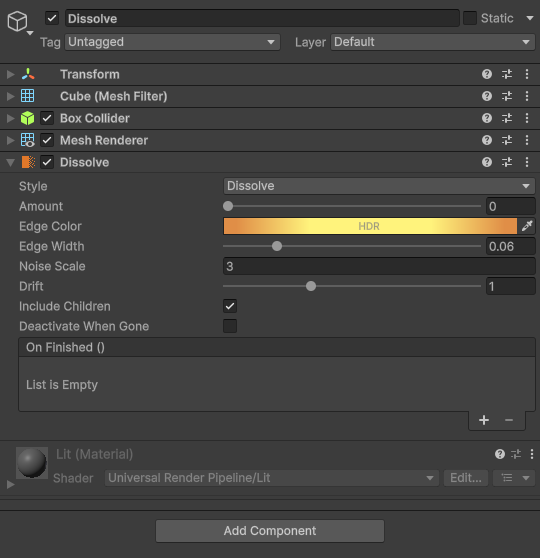
What you should see
While it runs, the enemy's Mesh Renderers and Skinned Mesh Renderers show copies of their materials on the Pass Forge/Lit Effects shader, which is URP Lit with the effect on top. When it is done, the original materials come back. On a Sprite Renderer the sprite keeps its own material and look while it dissolves.
If it does not work
- A Shader Graph or toon material looks plain while dissolving. A material on another shader is drawn as URP Lit while the effect runs, keeping only its base texture and color when they are named
_BaseMapand_BaseColor, or_MainTexand_Color. - The build says the Lit Effects shader is missing. A build keeps it when a Dissolve is in one of the build's scenes. When a script adds the component while the game runs, tick Dissolve, Occluder Fade And Cross Section Added From Scripts under Project Settings > Pass Forge.
- The outline traces the body as it dissolves. Fade the Highlight out with
FadeOut(0.25f)as the dissolve starts. - On the 2D Renderer a mesh dissolves unlit. The 2D Renderer draws URP Lit unlit. Sprites keep their own material while they dissolve when the 2D Renderer's Depth/Stencil Buffer is on; the Dissolve inspector offers to turn it on.
- Drift does nothing on a sprite. Drift moves only meshes; sprites crumble in place.
From a script
using PassForge.Effects;
using UnityEngine;

public class EnemyDeath : MonoBehaviour
{
    [SerializeField] PassForgeMoment m_Kill;       // such as a white flash and a shockwave
    [SerializeField] PassForgeHighlight m_Outline;
    [SerializeField] PassForgeDissolve m_Dissolve;

    void OnEnable() => m_Dissolve.onFinished.AddListener(OnDissolved);
    void OnDisable() => m_Dissolve.onFinished.RemoveListener(OnDissolved);

    public void Die()
    {
        m_Kill.Play();
        m_Outline.FadeOut(0.25f);
        m_Dissolve.Dissolve(0.8f);
    }

    void OnDissolved() => gameObject.SetActive(false);   // which also takes it off the radar

    public void Respawn()
    {
        gameObject.SetActive(true);
        m_Dissolve.amount = 0f;
        m_Outline.FadeIn(0f);
    }
}