How do I
Add a compass bar
Choose GameObject > Pass Forge > Compass Bar and a style; Off-screen Indicators with Show On Compass show on it, and a Pass Forge Route shows as a caret.
You want
A compass strip at the top of the screen, as in open world and shooter games, with N, E, S and W, the objectives you marked and their distances.
Steps
- Choose GameObject > Pass Forge > Compass Bar and pick a style:
- Simple.
- Degrees, with the degrees between the letters and the heading in a box in the middle.
- Military, in green, with the degrees and heading on a strip of their own and the markers in a row below, their distances always written.
- Curved, a band whose marks crowd toward its ends, which bend down.
- On Frosted Glass, a Simple bar filling a frosted glass PF Panel.
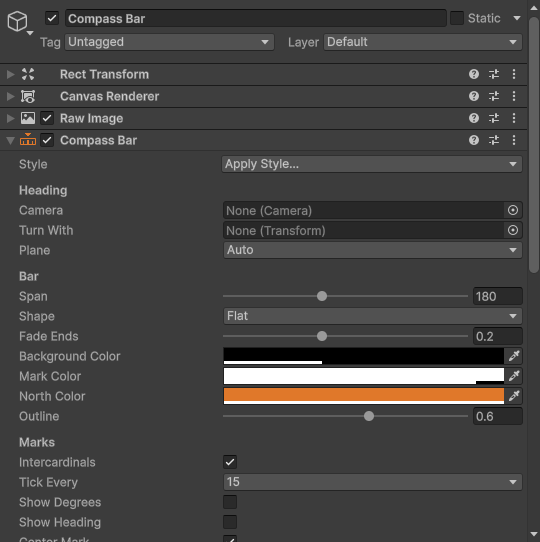
- Leave Camera empty to follow the camera tagged MainCamera, or set Turn With to an object, such as a vehicle, to show its facing.
- Set Span: 180 shows everything in front of the player, 360 the whole way round.
- On each objective's Pass Forge Off-screen Indicator, tick Show On Compass. It shows on the bar with its own icon, color, size and pulse, and its distance when Show Distance is on.
- Set Marker Row to On The Strip or Below The Strip.
- To restyle a bar you already have, press Apply Style at the top of its inspector. Undo takes it back.
Inspector
What you should see
The letters and ticks turn with the camera. North is the world's Z axis, or Y in 2D, the same north as on the Fog of War Minimap and Radar. Objects outside the span wait at the nearest end, with a count of the others, such as +3, and small arrows say when an object is far above or below. Pings from Ping moment steps and PassForgePings.Ping show on the bar.
If it does not work
- The menu item is missing, or a script naming the bar does not compile. The Compass Bar needs the Unity UI package,
com.unity.ugui. - N always stays in the middle. The camera never turns, as in many top down games. The markers still show which way each object lies; set Turn With to the player's character to turn the bar with it.
- The glass behind On Frosted Glass is plain gray. The glass is a PF Panel, a screen effect. Run Tools > Pass Forge > Set Up Effects and turn Post Processing on for the camera. The bar's inspector says what is missing, with a button for each. The bar itself shows either way.
- Apply Style made the bar bigger. A style sets the size the menu makes it at, so its text stays readable. Undo takes it back.
- The text is too small. The inspector warns when its text would be under 12 pixels tall on a 1280x720 screen.
- On a phone the notch covers it. Put the bar in a safe area panel of your own.
- The bar shakes with the picture. On a Screen Space - Camera canvas the bar is part of the picture, so Screen Shake and CRT change it too. A Screen Space - Overlay canvas keeps it steady.