Component
Tether
Draws a beam, a lightning bolt or a chain on screen from one object to another, and on through more objects for chain lightning.
What it does
A Tether draws a link on screen from its object to a target: a glowing Beam, a crackling Lightning bolt, or a dashed Chain. It follows both ends as they move.
Use it for a life link between a healer and an ally in an MMO, a lock-on line from a turret to its target, a leash between a pet and its owner, a grappling chain, or the wires of a puzzle that connects pylons. Then To lists more objects the tether jumps on to after its target, one after another, so a lightning spell arcs from the caster through a row of enemies.
For a bolt that flashes for a moment with no component, call PassForgeTether.Strike(from, to), or PassForgeTether.ChainStrike(caster, enemies) for chain lightning that follows them. The Lightning Bolt moment step and the Lightning Bolt and Lightning Strike moment presets strike from the sky down to where the moment plays.
Tethers are a screen effect that needs no Volume. A Volume's Tethers override restyles them all at once.
Add it
- Select the object the tether starts from, such as the healer.
- Choose Add Component > Pass Forge > Tether.
- Drag the other object into Target. Until then, a note says the tether shows once it has a Target.
- Run Tools > Pass Forge > Set Up Effects once per project and turn Post Processing on for the camera. The Inspector warns and offers a button for each while one is missing.
- Look at the Game view. A light blue beam joins the two objects.
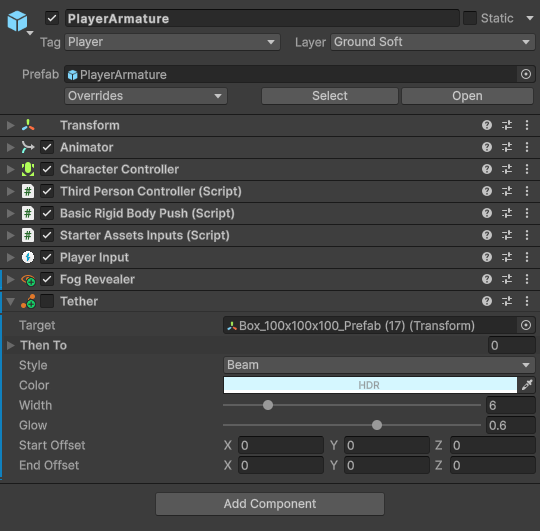
There is no GameObject menu item for it.
Settings
| Setting | What it does |
|---|---|
| Target | The object the tether reaches to. The tether shows only while a target is set. |
| Then To | More objects the tether jumps on to after its Target, one after another, for chain lightning arcing between enemies. Empty entries are skipped. |
| Style | How the tether is drawn: Beam (default), Lightning or Chain. |
| Color | Color of the tether, with HDR. HDR values feed bloom. Default light blue. |
| Width | Width of the tether in pixels, from 1 to 32. Default 6. |
| Jitter | Shows for Lightning. How far lightning bends and branches off its straight path, from 0 to 1. Default 0.6. |
| Speed | Shows for Lightning and Chain. How fast lightning jumps to a new path and a chain's links crawl along it, from 0 to 10. Default 3. |
| Glow | How much light glows around the tether, from 0 to 1. Default 0.6. Zero draws only its line. |
| Start Offset | Where the tether starts, in this object's local space, such as the healer's hand. |
| End Offset | Where the tether ends, in the target's local space, such as the ally's chest. Each object in Then To uses it too, in its own local space. |
At the top, a warning says when this tether does not show, or shows only some of its links, because tethers enabled before it already draw eight links.
Common jobs
Link a healer to an ally
- Add a Tether to the healer, with Target set to the ally.
- Set Style to Beam, Color to a soft green, and Start Offset to the hand's height, such as 0, 1.2, 0.5.
- Switch the component on while the heal channels, and off when it stops.
Chain lightning that stays on
- Add a Tether to the caster, Style Lightning.
- Set Target to the first enemy and add the next enemies to Then To.
The bolt arcs from the caster to the first enemy, then on from enemy to enemy. Each link counts toward the eight that show at once.
Chain lightning for a moment
Call PassForgeTether.ChainStrike(caster, enemies) from the spell's script. The bolts follow the enemies as they move and fade over half a second. No component is needed.
A lightning strike from the sky
Add Add Component > Pass Forge > Moment, pick the Lightning Strike or Lightning Bolt preset, and play it where the strike lands. Or add a Lightning Bolt step to a moment of your own.
Try a bolt in the editor
Add Add Override > Pass Forge > Gameplay > Tethers to a Volume. Its Inspector has a Try row: Bolt flashes a bolt in front of the camera, in Edit Mode too, so a restyle shows at once.
Restyle every tether at once
On the Volume's Tethers override, Jaggedness, Speed and Glow take over each tether's own Jitter, Speed and Glow while ticked. Intensity (zero turns tethers off), Resolution Scale and Mask are there too.
From a script
using System.Collections.Generic;
using PassForge.Effects;
using UnityEngine;

public class LightningSpell : MonoBehaviour
{
    [SerializeField] PassForgeTether m_Link;          // on the caster, switched off in the scene
    readonly List<Transform> m_Enemies = new List<Transform>();

    // A link that stays while the spell channels.
    public void Channel(Transform first, IEnumerable<Transform> rest)
    {
        m_Link.style = TetherStyle.Lightning;
        m_Link.target = first;                         // the first link
        m_Link.thenTo.Clear();
        m_Link.thenTo.AddRange(rest);                  // then on from enemy to enemy
        m_Link.enabled = true;
    }

    public void StopChannel() => m_Link.enabled = false;

    // A flash with no component: from the caster through the enemies, following them, for half a second.
    public void Cast() => PassForgeTether.ChainStrike(transform, m_Enemies, 0.5f);

    // A bolt between two points, in a color and a width in pixels.
    public void Zap(Vector3 from, Vector3 to) => PassForgeTether.Strike(from, to, 0.3f, Color.magenta, 10f);

    // Ends every flashing bolt at once, such as on a scene change.
    public void ClearBolts() => PassForgeTether.ClearStrikes();
}
Good to know
- Eight links at once. Up to eight links show at once, counted across every enabled tether in the order they were enabled: one to each target, and one to each object in Then To. Bolts from
StrikeandChainStriketake the places left after the tethers' links, so eight links held by components leave no room for a flash. Up to eight bolts are kept at once, a new one replacing the oldest. - Several per object. An object can hold more than one Tether, such as one beam to each ally.
- Pixels. Width is in pixels, so a tether keeps its width on screen at any distance.
- No component for flashes.
Strikedefaults to 0.4 seconds and 8 pixels wide;ChainStriketo 0.5 seconds. Bolts flicker as they fade. - Screen effect needs. Tethers need Set Up Effects and Post Processing on the camera. They draw after every screen look, unless HUD Under Looks is ticked in a Volume.