Component
Fog of War Radar
Turns a Fog of War Minimap into a radar with distance rings, a sweep and blips for enemies, your side, objectives and pings, showing only what the fog shows.
What it does
The Fog of War Radar draws a radar screen over a Fog of War Minimap: distance rings with their distances written on them, a sweep that goes round, a mark for north, an arrow in the middle for the player, and blips for what is around.
Blips come with nothing added to the objects. Objects on the Fog of War's Hide While Unseen layers show as enemies, those on Hide Until Explored as neutral things, Fog Revealers of your side as friends, and Off-screen Indicators as objectives in their own color and icon. Pass Forge Radar Blip puts anything else on the radar, or gives an object a kind, shape or color of its own. Each kind has its own shape as well as its color: enemies are diamonds, your side arrows, neutral things squares, and objectives dots or their icon.
By default the radar never gives away more than the fog: an enemy shows only while your side sees it, and leaves a hollow mark where it was last seen. Everything In Range turns it into a motion tracker for a horror or sci-fi shooter. Painted By Sweep draws blips only where the sweep last caught them, as on a submarine's screen. Pings from a gunshot or a sonar show as spreading rings, and a sonar ping can reveal hidden enemies for a few seconds.
It comes in five looks: Military, Sonar, Amber, Tactical Map and Hologram. It is UI: it needs no Volume and no Set Up Effects, and it works without a Fog of War too.
Add it
- Choose GameObject > Pass Forge > Fog of War Radar and pick a look: Military, Sonar, Amber, Tactical Map or Hologram.
- A round 240 x 240 radar goes to the top right corner of the selected UI object's canvas, or of a new Screen Space - Overlay canvas. It is a Fog of War Minimap following the object tagged Player, with Show Camera View off, and the radar on it.
- Put your enemies on a layer of their own, such as Enemy, and tick it in the Fog of War's Hide While Unseen. Or add a Radar Blip to them.
- Press Play. Enemies your side sees show as red diamonds; your own units as blue arrows.
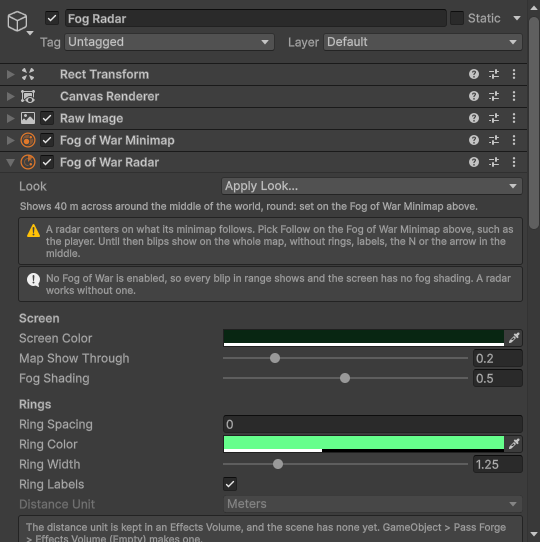
On a minimap you have, press Add Radar at the bottom of its Inspector, or add Add Component > Pass Forge > Fog of War Radar to the minimap's object. The radar needs a Fog of War Minimap on the same object and adds one if it has none.
Settings
At the top, Look has an Apply Look... button with the five looks. A look sets the screen, rings, sweep, how blips draw, and the minimap's border. What shows, the colors of each kind and On Contact stay as they are. Tactical Map keeps the minimap's own border. In 2D a look leaves ring labels off. Edit > Undo takes it back.
Under it, one line sums up what the minimap above sets for the radar, such as "Centers on Player, 20 m to the rim, round, North Up: set on the Fog of War Minimap above." The radar reaches half the minimap's View Size from the middle.
Screen
| Setting | What it does |
|---|---|
| Screen Color | Color of the radar screen. Default dark green. |
| Map Show Through | How much of the minimap's map shows through the radar screen, from 0 to 1. Default 0.2. Zero shows only the screen; one shows the map with the rings and blips over it. |
| Fog Shading | How much darker the screen is over places never seen, and a little over places explored but out of sight, from 0 to 1. Default 0.5. Zero shades nothing. |
Rings
Rings, labels and the north mark need Follow on the minimap.
| Setting | What it does |
|---|---|
| Ring Spacing | Meters between distance rings. Default 0, which picks a round number that gives two to four rings across the radar's range. |
| Ring Color | Color of the rings and cross lines. Alpha sets how strong they are. |
| Ring Width | Width of the rings, in pixels, from 0.5 to 4. Default 1.25. |
| Ring Labels | Write each ring's distance on it, such as 10m. On by default, off in 2D. Labels write whole meters, so a Ring Spacing such as 2.5 has none. Labels under 7 pixels tall are left out, and they shrink to fit between close rings. |
| Distance Unit | Meters or Feet for every distance the HUD writes, ring labels included. One setting for the whole game, kept on the Off-screen Indicators effect in the scene's Effects Volume, and grayed out until the scene has one; Create Effects Volume under it makes one. |
| Cross Lines | Lines through the middle from north to south and east to west. On by default. |
| Show North | Mark north on the rim, which helps when the minimap turns. On by default. |
| North Mark | Shows with Show North. An N (Letter, default), or a small Triangle pointing north, which reads in any language. An N too small to read is drawn as the triangle. |
Sweep
| Setting | What it does |
|---|---|
| Sweep | A beam that goes round and round, leaving a fading trail. On by default. |
| Sweep Seconds | Shows with Sweep. Seconds the sweep takes to go round once, from 0.5 to 20. Default 3. |
| Sweep Color | Shows with Sweep. Color of the sweep; alpha sets how bright it is. |
| Sweep Trail | Shows with Sweep. Degrees of fading light the sweep leaves behind it, from 5 to 360. Default 60. |
Blips
| Setting | What it does |
|---|---|
| Show | What The Fog Shows (default): enemies only while your side sees them, neutral things once their place is explored, your side and objectives always. Everything In Range: all of them, as a motion tracker would. |
| Display | Live (default): blips follow their objects. Painted By Sweep: blips appear where the sweep catches them and fade until it comes round again. Painting needs the Sweep; without it blips show Live, and a note says so. |
| Remember Seconds | Seconds an enemy's last seen place stays on the radar, hollow and fading, after it leaves sight. Default 3. Zero forgets it at once. |
| Blip Size | Size of the blips, as a share of the radar's width, from 0.01 to 0.1. Default 0.035. |
| Other Floor At | Hidden in 2D. Things more than this many meters above or below the followed object draw hollow, with an arrow up or down, for other floors. Default 2.5. Zero draws every height alike. Floors are measured from each object's pivot. |
| Hostile Color | Color of enemies. Default red. |
| Friendly Color | Color of your side. Default blue. |
| Neutral Color | Color of neutral things, such as buildings or treasure. Default yellow. |
| Objective Color | Color of objectives that have no color of their own. Default white. Off-screen Indicators keep their own color. |
| Show Self | Draw an arrow in the middle for the followed object, pointing the way it faces. On by default. |
| Self Color | Shows with Show Self. Color of the arrow in the middle. Default white. |
Shows On The Radar
Objects with a Radar Blip show as their Radar Blip says.
| Setting | What it does |
|---|---|
| From Hiding Layers | Objects on the Fog of War's Hide While Unseen layers show as enemies, and those on Hide Until Explored as neutral things, with nothing added to them. On by default. A line under it lists the layers it reads. |
| From Revealers | Fog Revealers of the teams the fog shows appear as friends, pointing the way they face. The minimap then leaves out its revealer dots. On by default. Off, they are left out, and never show as enemies. |
| From Indicators | Off-screen Indicators appear as objectives in their own color and icon, on the rim while out of range. On by default. One on an object on a Hide While Unseen layer shows only while that object is seen. |
| Show Pings | Show pings from Ping moment steps and PassForgePings.Ping. On by default. |
Other
| Setting | What it does |
|---|---|
| Unscaled Time | Turn the sweep and fade the blips in real time, so the radar keeps going while the game is paused. On by default. |
| On Contact | Called with each enemy as it shows up on the radar, for a warning beep. In Painted By Sweep it comes when the sweep first paints the enemy. Play Mode only. |
Notes and buttons the Inspector shows
- "A radar centers on what its minimap follows", when the minimap's Follow is empty. Until then, blips show on the whole map, with no rings, labels, N or middle arrow.
- "No Fog of War is enabled, so every blip in range shows". A radar works without one.
- The square Raw Image warning.
- "The camera's outline shows under the radar screen", with a Switch Off button for the minimap's Show Camera View.
- Ring notes: no labels for a Ring Spacing that is not whole meters, only the first 16 rings draw, labels on the first eight.
- "The Fog of War has no Hiding layers", with what to do.
- Outside Play Mode, the sweep turns in the Game view while the radar is selected. In Play Mode, a line such as "Showing 12 of 12 things in range, 2 remembered, 1 ping."
- At the top, a warning when it shows nothing or not everything: the minimap switched off, no canvas, the Raw Image off, the shader missing, or more than 32 things in range.
Common jobs
Show enemies only when your side sees them
- Put enemies on a layer named Enemy, and tick it in the Fog of War's Hide While Unseen.
- Keep the radar's Show at What The Fog Shows.
An enemy shows while a Fog Revealer of your side sees it. When it leaves sight it leaves a hollow mark for Remember Seconds.
A motion tracker
Set Show to Everything In Range and Display to Painted By Sweep, with Sweep Seconds about 2. Every enemy in range shows where the sweep last caught it, seen or not.
Beep when an enemy appears
Add your audio source's Play to On Contact. It is called with each enemy as it shows up. An object that leaves the radar, by being switched off or going out of range, is a new contact when it comes back.
A sonar pulse that reveals enemies
Play the Sonar Ping moment preset where the player is, or call PassForgePings.Ping(position, color, 4f, 25f, revealEnemies: true). Enemies within 25 meters show on every radar for 4 seconds, even out of sight. With a Moment's Ping step, tick Reveal Enemies.
Ping a gunshot with a sign
Use the Shot Fired moment preset, or call PassForgePings.Ping(muzzle, color, PingShape.Sound, 2f, 6f). The ring spreads to its radius on radars, with a sound sign in its middle, and the same ping shows on Compass Bars. Signs are Ring, Warning, Enemy, Ally, Help, Objective, Sound and Icon. A ping out of range shows as a short arc just inside the border, toward it.
Mark a quest target on the radar's rim
Give the target an Off-screen Indicator. It shows as an objective in its own color and icon, and while out of range it waits on the rim and points the way. For a radar-only marker, switch the indicator's Show At Screen Edge and Show On Compass off. A Radar Blip with Show Beyond Range does the same without an icon.
Allies and enemies in multiplayer
Add a Radar Blip set to By Team to each player prefab. A blip is friendly when the Fog of War shows its team and hostile otherwise, so fog.visibleTeams = 1 << localTeam; turns every such blip the right way on each player's machine.
From a script
using PassForge.Effects;
using UnityEngine;

// Needs the Unity UI package (com.unity.ugui).
public class RadarHud : MonoBehaviour
{
    [SerializeField] PassForgeFogRadar m_Radar;          // on the minimap's Raw Image
    [SerializeField] AudioSource m_Beep;
    [SerializeField] RectTransform m_Tooltip;            // a child of the radar's Raw Image

    void OnEnable() => m_Radar.onContact.AddListener(OnContact);
    void OnDisable() => m_Radar.onContact.RemoveListener(OnContact);

    void OnContact(GameObject enemy) => m_Beep.Play();   // each enemy as it shows up

    public void NightMode() => m_Radar.ApplyLook(RadarLook.Sonar);   // the look only; what shows stays

    public void MotionTracker()
    {
        m_Radar.show = RadarFogRule.Everything;          // everything in range, seen or not
        m_Radar.display = RadarBlipDisplay.PaintedBySweep;
    }

    // Puts a tooltip over a point, such as a blip. 0 to 1 across the Raw Image; false when out of range.
    public void PlaceTooltip(Vector3 world)
    {
        bool inRange = m_Radar.WorldToRadar(world, out var point);
        m_Tooltip.gameObject.SetActive(inRange);
        m_Tooltip.anchorMin = m_Tooltip.anchorMax = point;
    }

    public float rangeMeters => m_Radar.range;           // half the minimap's View Size
}
using PassForge.Effects;
using UnityEngine;
public static class RadarPings
{
// Close pings of one color merge, so a weapon can call this on every shot.
public static void Shot(Vector3 muzzle) => PassForgePings.Ping(muzzle, new Color(1f, 0.32f, 0.22f), PingShape.Sound, 2f, 6f);
// Sonar: enemies within 25 m show on every radar for four seconds, even out of sight.
public static void Sonar(Vector3 player) =>
PassForgePings.Ping(player, new Color(0.4f, 0.9f, 1f), 4f, 25f, revealEnemies: true);
// An ally calling for help: the ping follows them while it shows.
public static void Help(Transform ally) => PassForgePings.Ping(ally, Color.green, 5f, 8f, PingShape.Help);
public static void ClearAll() => PassForgePings.Clear(); // such as when the player respawns
}Good to know
- Limits. A radar draws 32 blips at once, the nearest, objectives first, and 16 rings, with labels on the first eight. Eight pings show at once, shared with Compass Bars, a new one replacing the oldest; close pings of one color merge.
- Follow. Rings, labels, the north mark and the middle arrow need the minimap's Follow. Without it, blips sit on the whole map.
- Square. A radar needs a square Raw Image.
- Without a Fog of War, or with the fog switched off, everything in range shows from Radar Blips, Fog Revealers, Off-screen Indicators and pings, and the hiding layers add nothing.
- What counts as one object. The topmost object on a hiding layer counts as one object with everything under it. A parent whose children lie more than 4 m apart is a group instead, and each child counts on its own. A Radar Blip, Off-screen Indicator or Fog Revealer stands for the hiding object it is on.
- Switched off objects never show on radars, so pooled and dead enemies leave them. Switching only an object's renderers off does not take it off radars.
- Keep one object off radars by giving it a Radar Blip and switching the Radar Blip off.
- With From Revealers off, your side's units on a hiding layer are left out.
- No filter per player. Every radar shows every Off-screen Indicator and ping, so split-screen players see each other's objectives.
- Overlay or Camera canvas. On a Screen Space - Overlay canvas the radar draws after every screen effect, and it adjusts blips, pings and the route for the player's color blindness. Blips also tell their kind by shape.
- 2D. With an XY (2D) fog, or without a fog when the main camera is orthographic and looks along Z, the radar lies on X and Y. Things face the way their Y axis points, there are no floors, and ring labels start off.
- Safe mode draws no glint as the sweep passes a blip, starts pings without their bright flash, and keeps painted blips from going fully dark between passes. The flash slider also dims the glints.
- Cost. With tens of thousands of renderers, the once a second search for objects on the hiding layers costs more; keep Hiding layers to the objects that need them.